
I’ve been obsessed with ZFS since last year. For those who know, it’s legendary; for those who don’t, let’s just call it a file system. But not just any file system—they often call it the “last word in file systems.” 🙂
My journey into ZFS started with a simple desire: high-security data storage using low-cost disks. After running some tests on my home virtualization lab, I picked up a used HP MicroServer N40L around late 2017. I paired it with two 3TB “nearline enterprise” Hitachi drives. Back then, the total setup cost me about 1100 TL. For that price, I gained enterprise-grade features like near-infinite snapshots and advanced data management.
In this post, I want to dive into the data loss prevention side of things.
What am I comparing it to?
I’m comparing it to enterprise storage servers equipped with high-capacity (but not necessarily high-performance) (1) drives. The cost per TB for those proprietary systems can easily hit $1,000. Let’s call it $10,000 for 10TB to keep the math simple. Our goal? Dropping that cost to the $2,500 range. Round numbers are better for the soul.
Our main benchmark here is data integrity. Here is a bit of insight into why we pay a premium for enterprise drives over “consumer” ones: every hard drive will eventually hit a 1-bit error. (2) It could happen on day one, or in year five. It could hit a random pixel in a vacation photo, or it could corrupt a critical database backup. Even worse, these errors are often silent. You might not notice until you actually need that data—and by then, it’s too late. Obviously, the enterprise-grade disks are built different in other ways, such as 24/7 operation, but our focus is on that “eventual” error for now.
This is exactly what we are trying to avoid: critical data, like a database or a legal contract, turning into junk. (3) Standard “off-the-shelf” SATA drives typically have an error rate of 1 in 10^14 bits. Enterprise-grade SAS drives sit at 1 in 10^16. This means the cheap SATA drive in your PC is statistically 100 times more likely to fail you than the expensive SAS drive in a server room.
“But I’m already running RAID1 on my servers?”
Good job. But unfortunately, RAID alone won’t save you from these statistical bit errors.
RAID1 is designed for total disk failure. Imagine you have two notebooks that are identical copies of each other. If one gets lost or you spill beer on it, you can just buy a new one and copy everything back from the surviving copy.
But what if the person copying the data misreads “1,000,000€” as “100,000€” while reading from the “good” notebook? Congratulations, you now have a data inconsistency. Good luck figuring out which one was correct five years from now. 🙂
How does ZFS handle this?
It does something clever: for every block of data it writes, it also writes a “checksum.” Think of it as a unique mathematical fingerprint of that data. If you ever suspect a file is corrupted, you recalculate this fingerprint and compare it to the original. If they match, the data is healthy. If they don’t, something is wrong.
Because of this, ZFS always knows if the data it reads is correct. In a typical ZFS mirror (two disks), you run periodic “scrubs.” ZFS reads data from both disks, checks them against the original checksums, and if it finds a corrupt bit on one disk, it automatically heals it using the healthy data from the other, which is why it is said to be “self-healing”.
Alright. Let’s talk numbers
Keeping our round numbers, let’s look at that $10,000 quote for 10TB ($1,000/TB).
The DIY system I built consists of six 4TB drives (4). For maximum safety, we mirror them in pairs (VDEVs), giving us 12TB of usable space. I went with a GIGABYTE motherboard that supports Intel Xeon, and didn’t hold back on the specs: an Intel Xeon E5-2620 paired with 64GB of ECC RAM. (I’ll question the necessity of that much RAM in a future post! :)) The total bill came to around $2,300.
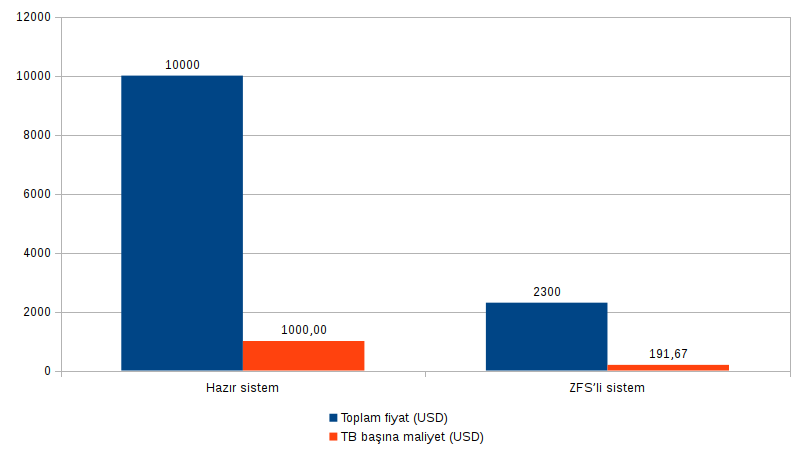
That’s a cost saving of $8,000 for a 10TB setup—a very common size for enterprise storage. You could see this purely as a saving, but I’d suggest using that extra budget to take data security a step further:
- Off-site replication: Imagine your main building suffers a fire or flood. Keeping an identical second system at another location leaves you with a $16,000 cost advantage compared to two proprietary units.
- High Availability: You can keep a second machine ready at your main site just to take over in case of hardware failure. Cost savings of 24k at this level.
Now, this does not automatically mean “not buying proprietary products is clever”. Those devices do provide value to varying degrees, additional features, and you might not be able to engineer your rig to their standards. At the end of the day, those devices have been designed by subject matter experts in a costly process, maybe certified, and the maker is obliged to provide support at least to some degree. It’s just that, if what you are after is solely a safe place to store your data, ZFS might be the answer. If you’re after storage at home, well, proprietary enterprise hardware don’t even consider you a potential buyer, so it’s a no-brainer using ZFS at home.
Notes
- For heavy database applications, you’ll need much more RAM, faster CPUs, etc. That requires a different comparison, but ZFS should still be the backbone of that storage subsystem.
- If you look at hard drive data sheets, you’ll see “Unrecoverable Read Error” (URE). For consumer SATA, it’s 10^14. For “Nearline Enterprise” SATA (like the ones in this post), it’s 10^15, and for full “Enterprise” SAS, it’s 10^16. This value defines the probability of an error occurring.
- A single bit error might not matter in a JPG photo, but it could completely break a compressed database backup.
- I calculated this based on the 4TB versions of the drives I use at home: Hitachi Ultrastar 4K7000 series.